 Available on iOS and Android
WARDR
Your private AI wardrobe. No account required, and your closet stays on your device.
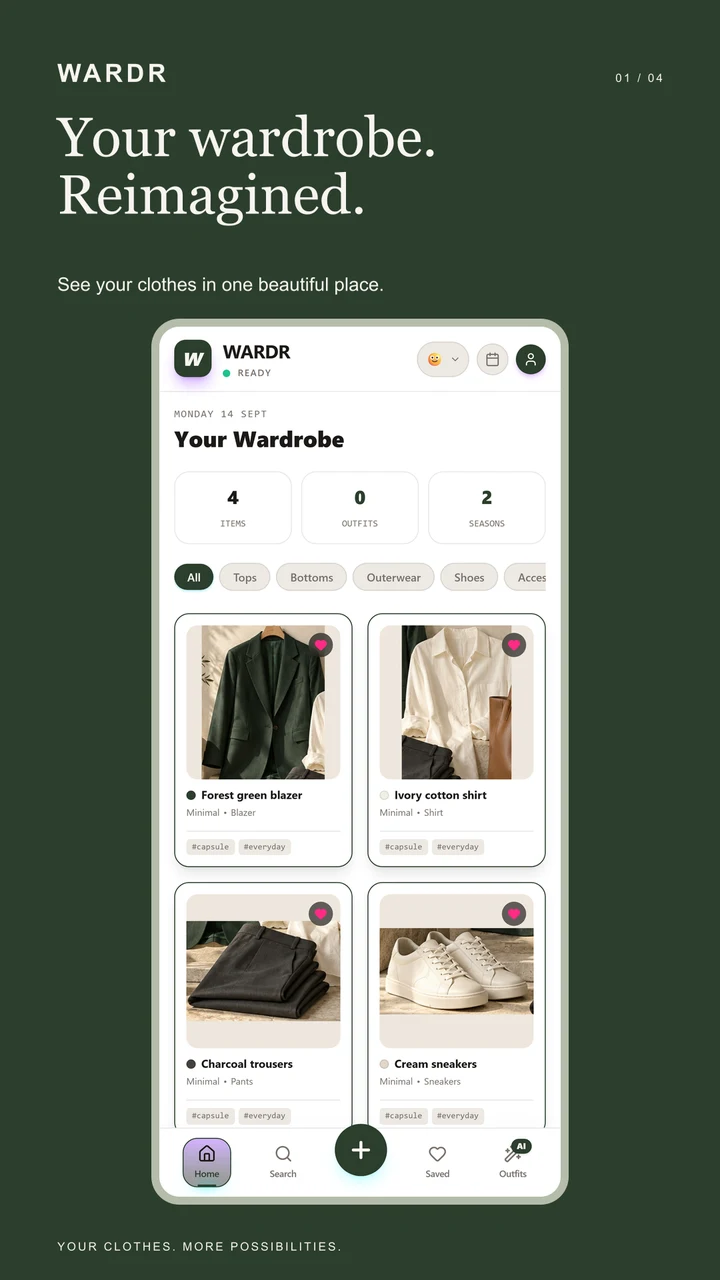
WARDR is a smart AI wardrobe assistant: scan your closet, get automatic background removal and category analysis, and build a one-tap digital wardrobe you actually keep using. No account is required — your clothing photos, outfits, style profile, and packing lists live in local app storage on your device, with optional Cloud Backup for Premium subscribers who choose to sign in.
Clothing recognition runs with on-device AI models, so a photo doesn’t need to leave your phone for core scanning, and the app stays usable offline. Optional online features — an enhanced scan fallback, trend search, or weather-based outfit suggestions — are opt-in extras layered on top of a private-by-default core.
Community fits, a packing-list engine for trips, color-theory-aware outfit generation, and a calendar for planning what to wear round out the toolkit.
On-device scanning
Automatic background removal and category analysis run locally — no closet photo required to leave your phone.
Outfit generation
Color-theory-aware suggestions build outfits from what you already own.
Packing lists
A dedicated packing-list engine turns your wardrobe into trip-ready outfits.
No account required
Use every core feature without signing in. Sign-in is only for optional Cloud Backup, and you can delete your account at any time.
Screenshots.
Real captures — from the store listing where the game ships, or straight from the running build.
Privacy, at a glance.
The full policy for WARDR, kept in plain language.
Overview
WARDR does not require an account. Your clothing photos, outfits, style profile, packing lists, and app settings are stored in local app storage on your device unless you choose to sign in and turn on Cloud Backup.
On-device processing
Clothing recognition runs with on-device AI models. The photo does not need to leave your phone for core scanning, and the app remains usable offline.
Optional network features
When you actively request an online feature, WARDR sends the information needed for that request to its service providers: a clothing photo for an enhanced scan fallback, search text or season for trend results, or approximate location and wardrobe item information for weather-based outfit suggestions. Location is not tracked in the background. The information is used to return the requested result and protect or operate the service; Google Gemini and search providers may process prompts and related technical data under their own policies.
Account and Cloud Backup
Signing in is optional. If you sign in with Apple or Google, we receive your account identifier, and your name and email address if the provider shares them. This is used only to enable Cloud Backup & Sync for Premium subscribers. When Cloud Backup is on, your wardrobe items, photos, outfits, and profile data are stored in Google Firebase (Firestore and Cloud Storage) under your account, so you can restore them on another device. Without sign-in, all data stays on your device.
Purchases
Subscriptions and in-app purchases are processed by Apple (App Store) or Google (Google Play). We do not receive or store your payment details; we only receive confirmation of your purchase status to unlock Premium features. Manage or cancel a subscription in your App Store or Google Play account settings.
Third-party services and sharing
Optional ads send ad requests and interactions to Google AdMob, which may use device or advertising identifiers and technical information to deliver, limit, and measure ads. Optional online styling requests send the relevant photo, search text, season, or approximate location and wardrobe information to Google Gemini API or search providers to return results. If you opt into sign-in and Cloud Backup, account credentials and selected wardrobe data and photos are sent to Google Firebase Authentication, Firestore, and Cloud Storage for account access and backup. Meta services may receive standard app-event analytics for measurement. Apple iCloud or Android/Google device backup may also receive local app data if you enable backup in device settings. These providers may process information under their own privacy policies.
Permissions, retention, and choices
WARDR may request camera access when you take clothing photos, photo library access when you import images, and optional approximate location when you request weather suggestions. Local wardrobe data remains until you delete items or uninstall the app. Cloud backup data remains until you delete the backed-up items or account; ending Premium alone does not delete it. Backup deletion removes data from active account storage, though provider backups or security logs may persist for a limited period under Google’s retention practices. Store purchase records may be retained as required for legal and accounting obligations. You can delete individual items in the app, delete your account and cloud data, or remove remaining local data by uninstalling.
Deleting your data
You can delete your account and all cloud-stored data at any time in the app under Profile → Account → Delete Account. Local data can be removed by deleting items in the app or uninstalling it. You can also request deletion by emailing [email protected].
Children and contact
WARDR is not designed to require personal information from children. We do not sell personal data. Privacy questions and support requests can be sent to [email protected].